This was a big week. The Hub moved from a Claude-only workflow to a real multi-provider product, a brand-new Code section landed for read-only codebase exploration with AI summaries, and the Agents section was flipped on by default. Three minor releases shipped on top of last week’s patch.
Multi-provider: Claude and Codex CLI
Until now, the Hub assumed claude everywhere. That assumption is gone.
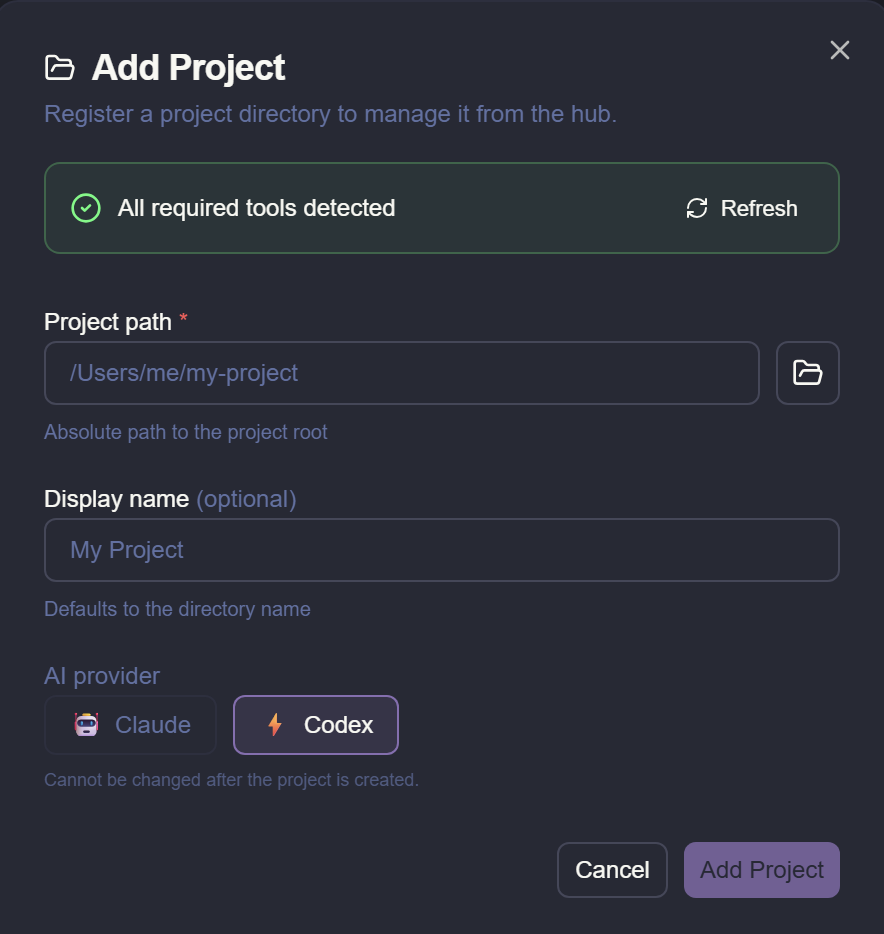
Every project now declares which AI CLI it runs against — Claude Code or Codex CLI — and the entire pipeline respects that choice. The change is invisible if you only use Claude (existing projects keep working), but if you’ve been waiting to drive SpecRails with Codex, this is the release.
Under the hood, the Hub now talks to providers through a single ProviderAdapter contract. Every manager that spawns an AI CLI — job rails, Explore Spec, Quick Spec, AI Edit, the setup wizard — consumes the adapter instead of branching on the provider name. Codex differs from Claude in a few places (no native cost reporting, no native OTEL exporter, different instructions filename), and the Hub fills those gaps:
- Cost fallback via a rate-card pricing module, so spending analytics keep working for Codex too.
- Synthetic OTEL bridge that turns Codex CLI output into the same OTLP spans/metrics/logs Claude emits, feeding the existing diagnostic ZIP export.
codex mcpplugin for per-project MCP server management with a sandboxedCODEX_HOMEunder~/.specrails/projects/<slug>/codex-home/.AGENTS.mdvsCLAUDE.mdis handled by the adapter, so contributors target the abstraction instead of hardcoding filenames.
There is also a developer-facing guide for adding a third provider — one file + one registry entry — and a user-facing docs page explaining how to pick Codex when adding a project.
Emergency rollback exists if anything goes sideways in your team: set SPECRAILS_HUB_CODEX_BETA=0 in the Hub env and Codex disappears from the picker.
This work shipped in v1.55.0 (PR #313).
Patch: v1.55.1 — Codex on Windows
A day after multi-provider landed, 1.55.1 fixed Codex rail routing on Windows. The chat-turn path was over-folding the system prompt for Codex; this is now contract-aligned (Codex receives only the user prompt; the system prompt goes through the documented Codex channel). Same fix also tightened a couple of terminal-settings event tests so the no-fold behavior can’t regress quietly.
A new “Code” section for non-developers
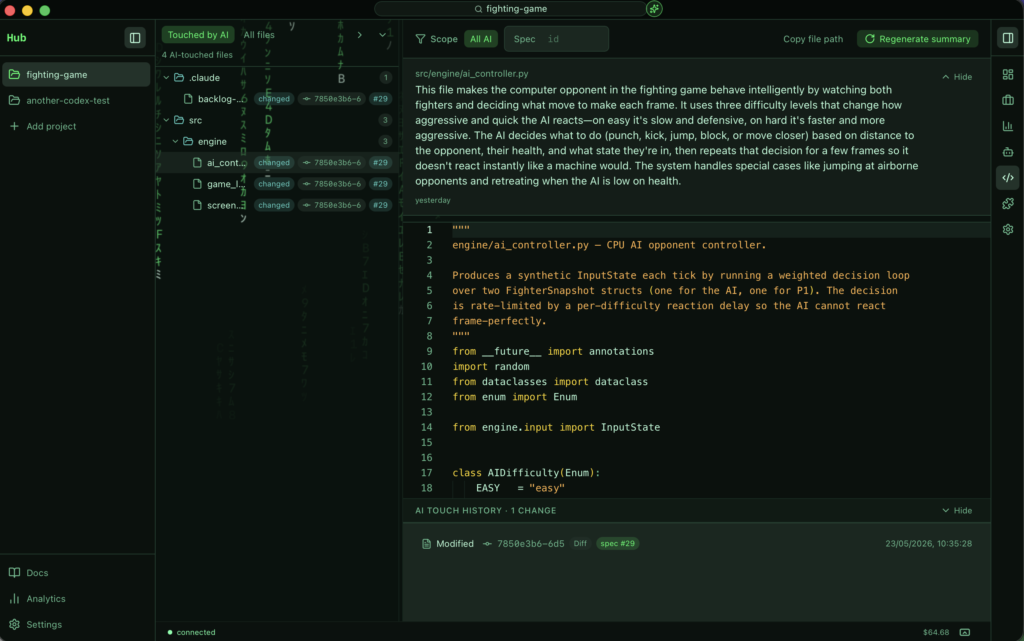
The Hub picked up a read-only Code section, per project, designed for people who want to understand what the codebase looks like without opening an IDE.
It has two panes:
- A virtualised file tree on the left, with provenance chips per file — small badges that tell you which ticket and which job last touched each file, so you can see what the AI has been changing recently.
- A Monaco viewer on the right, with a plain-language AI summary above the code. The summary explains what the file does in everyday terms, refreshed automatically (hash-gated) whenever the file actually changes.
Other things worth noting about this first cut:
- The default filter is “touched by AI” — so the tree only shows files that have come through the pipeline, with an “All files” toggle for the full tree.
- A “Files touched by this ticket” section is now embedded in the ticket detail modal, lazy-loaded and clickable.
- Cost is tracked: every file summary writes an
ai_invocationsrow with surfacefile-summary, so it shows up on the Analytics dashboard alongside jobs, Quick Spec, Explore Spec, and AI Edit. A hub-wide monthly budget (default $5) caps spend, with a user-initiated override available. - Summaries are stored under
<project>/.specrails/file-summaries/and gitignored by default — commit them if you want your team to share the same explanations.
Read-only is the deliberate v1 stance. No in-app editing yet; an “Edit in external editor” button copies the absolute path so you can jump straight into your editor of choice. Per-symbol summaries, conversational “ask the AI about this file”, narrative diff views, and directory-level summaries are explicit follow-ups.
The section is gated by VITE_FEATURE_CODE_EXPLORER on the client (default OFF in v1) and SPECRAILS_CODE_EXPLORER on the server (default ON). Shipped in v1.56.0 (PR #317).
Agents section on by default
The per-project Agents catalog (profiles, agent chains, model routing) has been opt-in behind a feature flag since it landed. This week the flag flipped: FEATURE_AGENTS_SECTION is now ON by default. You opt out via VITE_FEATURE_AGENTS_SECTION=false if you need to hide it.
Practically, that means new Hub installs see Agents in the right sidebar from day one, with the baseline trio (Architect / Developer / Reviewer) already in place and the Agents Catalog viewer available. Shipped in v1.57.0 (PR #319).
Patch: v1.54.3 — dashboard column width
Carried over from the start of the week: 1.54.3 restored the dashboard rails column width when the outer sidebar collapses. Small fix, but a visible one if you collapse/expand the sidebar a lot during a long session.
PRs
- https://github.com/fjpulidop/specrails-hub/pull/311 (v1.54.3 — dashboard rails width)
- https://github.com/fjpulidop/specrails-hub/pull/312 / https://github.com/fjpulidop/specrails-hub/pull/313 (v1.55.0 — multi-provider)
- https://github.com/fjpulidop/specrails-hub/pull/315 (v1.55.1 — Codex on Windows)
- https://github.com/fjpulidop/specrails-hub/pull/317 (v1.56.0 — Code section)
- https://github.com/fjpulidop/specrails-hub/pull/319 (v1.57.0 — Agents on by default)
Code
- https://github.com/fjpulidop/specrails-hub